

OVERVIEW
Before an AI system can structure knowledge or engineer intelligent behavior, it must first align the foundational data upon which those capabilities depend. Systems cannot reason accurately across time zones, resolve geographic inconsistencies, or discover entity relationships when data is fragmented or ambiguous. This is where normalization becomes essential. Normalization is not just about format alignment; it is about engineering a shared operational language—one that makes data interpretable, consistent, and semantically interoperable across systems, locations, and contexts.
THE TEMPORAL DIMENSION: NORMALIZING TIME
Time is a critical axis for understanding behavior, sequence, and causality. Yet, time-based data is often recorded inconsistently. For instance, in aviation, one system might log a departure time as “3/7/23,” another as “07-03-2023,” and a third might use a different time zone, like “GMT+1,” while another uses “EST.” At the Federal Aviation Administration (FAA), time is commonly recorded in Coordinated Universal Time (UTC), also referred to as “Zulu” time (Z) in aviation parlance, which eliminates ambiguity across time zones and ensures global synchronization (World Meteorological Organization, n.d.). Many aviation datasets—particularly flight logs and radar timestamps—default to Zulu time to maintain consistency across regional Air Traffic Control systems.
To ensure that all systems interpret and align time-based events consistently, it’s crucial to convert all time references to a standard format like ISO 8601 with UTC offsets. Where local time zones are used, best practice is to refer to them using IANA time zone IDs (e.g., America/New_York) instead of ambiguous abbreviations like EST/EDT. This process is vital not just for ordering logs or syncing records, but for driving real-time analytics, detecting temporal anomalies, and correlating events across distributed architectures, such as tracking a flight’s journey across multiple air traffic control sectors.
FIPS TAGGING: RESOLVING GEOGRAPHIC AMBIGUITY
Geospatial data also suffers from inconsistencies. For example, “L.A.,” “Los Angeles,” and “County 37” might all refer to the same location. In the context of the FAA, an airport might be identified by its IATA code (e.g., “LAX”), its ICAO code (e.g., “KLAX”), or its official name (“Los Angeles International Airport”). Federal Information Processing Standards (FIPS) codes provide standardized numeric identifiers that normalize place names at the state, county, and locality levels. For instance, the FIPS code for Los Angeles County is 06037, where ’06’ represents California and ‘037’ represents the county. This allows systems to perform geospatial joins, region-specific filtering, and spatial roll-ups across datasets, regardless of textual inconsistencies in location fields (Geocodio, n.d.; Metadapi, 2024).
4 ADDITIONAL NORMALIZATION TECHNIQUES
Beyond time and location, several other normalization methods are crucial for creating a unified data language:
- Value Normalization: This ensures that units of measurement, boolean values (e.g., “Yes”/”No” vs. true/false), and case sensitivity are standardized across all datasets.
- Identifier Reconciliation: This technique links disparate entity identifiers to a master identity. For example, an aircraft might have a registration number, a fleet number, and a transponder hex code. Reconciliation connects these to a single, authoritative aircraft entity.
- Text Normalization: This involves cleaning free-text fields by correcting typos, standardizing case, and removing extraneous characters or “noise.”
- Scale Normalization: This adjusts numerical values to a common range, which is especially important for inputs into machine learning models to prevent features with larger scales from dominating the learning process.
Once these layers of normalization are in place, the data becomes structurally interoperable, forming a unified data language that is an essential precursor to semantic modeling.
FROM DATA TO SEMANTICS: UNDERSTANDING RDF AND ONTOLOGY
As we move from structuring data to understanding its meaning, we enter the realm of semantic modeling. Ontologies provide formalized vocabularies for a specific domain, specifying the concepts and the relationships that link them (Wang, 2024). The Resource Description Framework (RDF) operationalizes these ontologies into machine-readable graphs using a simple yet powerful triple construct (W3C, 2014).
- Subject: The entity being described.
- Predicate: The property or relationship.
- Object: The value or related entity.
Each triple contributes to a semantic network, with nodes and edges distinctly identified by Uniform Resource Identifiers (URIs) to ensure clarity (Yüksel, 2022). This approach enables machines not only to read data, but to understand and reason about its relationships.
FAA DATA NORMALIZATION EXAMPLE IN PYTHON
Figure 1 demonstrates how to normalize FAA-related data in Python code. This example reads a list of dictionaries containing flight information with inconsistent timestamp formats and airport identifiers. It then normalizes the timestamps to the ISO 8601 UTC format and standardizes airport identifiers.
In addition to scripting approaches like Python, many organizations use ETL (Extract, Transform, Load) tools such as Azure Data Factory or Alteryx to design and automate data normalization pipelines. These platforms provide visual interfaces and built-in connectors, making it easier to implement repeatable workflows for transforming raw data into standardized formats—without writing extensive code.
from datetime import datetime
import pytz

def normalize_faa_data(records):
    normalized_records = []
    airport_code_map = {
        "Los Angeles Intl": "LAX",
        "LAX": "LAX",
        "JFK": "JFK",
        "John F. Kennedy Intl": "JFK",
    }

    for record in records:
        # Normalize timestamps to ISO 8601 UTC
        try:
            dt_obj = None
            if isinstance(record["timestamp"], str):
                ts = record["timestamp"]

                if "PST" in ts or "PDT" in ts:
                    # Strip timezone abbreviation and parse manually
                    clean_ts = ts.replace(" PST", "").replace(" PDT", "")
                    dt_obj = datetime.strptime(clean_ts, "%Y-%m-%d %H:%M:%S")
                    local_tz = pytz.timezone('US/Pacific')
                    aware_dt = local_tz.localize(dt_obj)
                else:
                    # Try MM/DD/YY HH:MM format
                    dt_obj = datetime.strptime(ts, "%m/%d/%y %H:%M")
                    local_tz = pytz.timezone('US/Pacific')
                    aware_dt = local_tz.localize(dt_obj)

                # Convert to UTC ISO 8601 string
                utc_dt = aware_dt.astimezone(pytz.utc)
                record["timestamp"] = utc_dt.isoformat()

        except (ValueError, TypeError) as e:
            print(f"Could not parse date for record {record}: {e}")
            record["timestamp"] = None

        # Normalize airport codes
        if "departure_airport" in record:
            record["departure_airport"] = airport_code_map.get(
                record["departure_airport"], record["departure_airport"]
            )
        if "arrival_airport" in record:
            record["arrival_airport"] = airport_code_map.get(
                record["arrival_airport"], record["arrival_airport"]
            )

        normalized_records.append(record)

    return normalized_records


# ----------------------------------
# Example FAA-related data
# ----------------------------------
raw_flight_data = [
    {
        "flight_id": "UA245",
        "timestamp": "2025-08-29 14:30:00 PST",
        "departure_airport": "Los Angeles Intl",
        "arrival_airport": "JFK"
    },
    {
        "flight_id": "AA101",
        "timestamp": "08/29/25 15:05",
        "departure_airport": "LAX",
        "arrival_airport": "John F. Kennedy Intl"
    },
    {
        "flight_id": "DL45",
        "timestamp": "Invalid-Date",
        "departure_airport": "LAX",
        "arrival_airport": "JFK"
    }
]


# Run normalization and print results
normalized_data = normalize_faa_data(raw_flight_data)
for item in normalized_data:
    print(item)
Figure 2 shows the output:
Figure 2: Normalizing FAA Data via Python Code – Output
Could not parse date for record {‘flight_id’: ‘DL45’, ‘timestamp’: ‘Invalid-Date’, ‘departure_airport’: ‘LAX’, ‘arrival_airport’: ‘JFK’}: time data ‘Invalid-Date’ does not match format ‘%m/%d/%y %H:%M’

BREAKDOWN OF EACH RECORD
UA245
- Original: “2025-08-29 14:30:00 PST”
- Parsed: Assumed US/Pacific (PST)
- Converted to UTC: 2025-08-29T21:30:00+00:00
AA101
- Original: “08/29/25 15:05”
- Parsed: MM/DD/YY HH:MM, assumed US/Pacific
- Converted to UTC: 2025-08-29T22:05:00+00:00
DL45
- Original: “Invalid-Date”
- Fails parsing → triggers exception
- Handled gracefully → timestamp set to None
TRANSLATING RDF INTO LABELED PROPERTY GRAPHS
While RDF excels in semantic richness and data integration, it is not always optimized for the types of complex graph traversals and interactive queries common in real-time analytics (Memgraph, n.d.). For these use cases, we often translate RDF into a Labeled Property Graph (LPG). LPGs restructure RDF triples into a model with nodes and edges where:
- Nodes carry labels (e.g., Person, Place) and properties (e.g., name).
- Edges represent labeled relationships (e.g., knows, livesIn) and can also have properties.
This transformation is not just a reshaping of syntax; it is an optimization for query performance, especially in graph database platforms like Neo4j (Neo4j, n.d.).
LPG CONVERSION LOGIC IN PYTHON
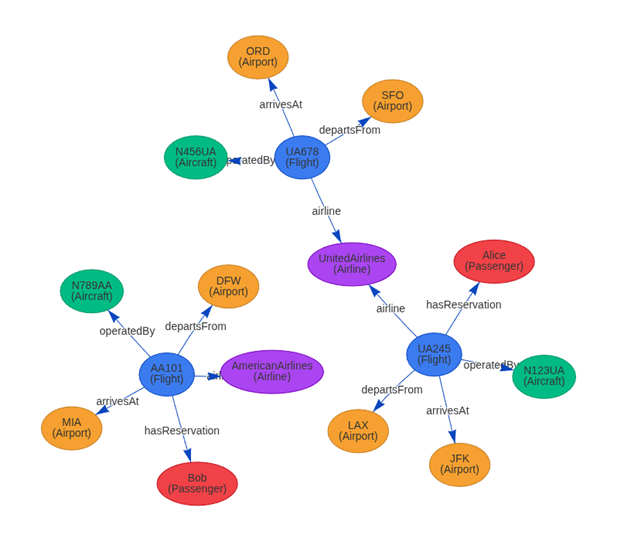
Figure 3 demonstrates the logic for converting an RDF graph into a Labeled Property Graph using the networkx library in Python code.
Figure 3: Logic for Converting an RDF Graph into a Labeled Property Graph Using Python Code
from rdflib import Graph, URIRef, Literal, Namespace
import networkx as nx
from pyvis.network import Network


# ---------------------------
# 1) Build RDF Graph
# ---------------------------
EX = Namespace("http://example.org/faa/")
g = Graph()
g.bind("faa", EX)


# Entities
flights = {
    "UA245": ("LAX", "JFK", "N123UA", "UnitedAirlines"),
    "UA678": ("SFO", "ORD", "N456UA", "UnitedAirlines"),
    "AA101": ("DFW", "MIA", "N789AA", "AmericanAirlines"),
}

aircrafts = {
    "N123UA": "Aircraft",
    "N456UA": "Aircraft",
    "N789AA": "Aircraft"
}

airports = {
    "LAX": "Los Angeles",
    "JFK": "New York JFK",
    "SFO": "San Francisco",
    "ORD": "Chicago O'Hare",
    "DFW": "Dallas-Fort Worth",
    "MIA": "Miami"
}

airlines = ["UnitedAirlines", "AmericanAirlines"]
passengers = {"Alice": "UA245", "Bob": "AA101"}


# Add flights
for flight, (dep, arr, ac, al) in flights.items():
    f_uri = URIRef(EX[flight])
    g.add((f_uri, EX.type, EX.Flight))
    g.add((f_uri, EX.departsFrom, URIRef(EX[dep])))
    g.add((f_uri, EX.arrivesAt, URIRef(EX[arr])))
    g.add((f_uri, EX.operatedBy, URIRef(EX[ac])))
    g.add((f_uri, EX.airline, URIRef(EX[al])))


# Add aircrafts
for ac, typ in aircrafts.items():
    ac_uri = URIRef(EX[ac])
    g.add((ac_uri, EX.type, EX[typ]))
    g.add((ac_uri, EX.registration, Literal(ac)))


# Add airports
for code, name in airports.items():
    ap_uri = URIRef(EX)
    g.add((ap_uri, EX.type, EX.Airport))
    g.add((ap_uri, EX.iataCode, Literal(code)))
    g.add((ap_uri, EX.name, Literal(name)))


# Add airlines
for al in airlines:
    al_uri = URIRef(EX[al])
    g.add((al_uri, EX.type, EX.Airline))
    g.add((al_uri, EX.name, Literal(al)))


# Add passengers and reservations
for person, flight in passengers.items():
    p_uri = URIRef(EX[person])
    g.add((p_uri, EX.type, EX.Passenger))
    g.add((p_uri, EX.name, Literal(person)))
    g.add((URIRef(EX[flight]), EX.hasReservation, p_uri))


# ----------------------------------
# 2) Convert RDF -> Property Graph
# ----------------------------------
lpg = nx.DiGraph()
props = {}


for s, p, o in g:
    s_id = str(s).split("/")[-1]
    p_label = str(p).split("/")[-1]

    if p_label == "type":
        o_label = str(o).split("/")[-1]
        props.setdefault(s_id, {})["label"] = o_label
        lpg.add_node(s_id)
    elif isinstance(o, URIRef):
        o_id = str(o).split("/")[-1]
        lpg.add_edge(s_id, o_id, label=p_label)
    else:
        props.setdefault(s_id, {})[p_label] = str(o)
        if s_id not in lpg:
            lpg.add_node(s_id)


for node, attributes in props.items():
    if node in lpg:
        lpg.nodes[node].update(attributes)


# ----------------------------------
# 3) Visualize with PyVis
# ----------------------------------
net = Network(height="800px", width="100%", directed=True, notebook=False, bgcolor="#ffffff")


type_colors = {
    "Flight": "#3b82f6",
    "Aircraft": "#10b981",
    "Airport": "#f59e0b",
    "Passenger": "#ef4444",
    "Airline": "#a855f7"
}


for node_id, attrs in lpg.nodes(data=True):
    node_type = attrs.get("label", "Thing")
    tooltip = "
".join(f"{k}: {v}" for k, v in attrs.items())
    display_label = f"{node_id}\\n({node_type})"
    net.add_node(
        node_id,
        label=display_label,
        title=tooltip or node_id,
        color=type_colors.get(node_type, "#9ca3af"),
        shape="ellipse"
    )


for u, v, eattrs in lpg.edges(data=True):
    elabel = eattrs.get("label", "")
    net.add_edge(u, v, label=elabel, title=elabel, arrows="to", smooth=True)


# Save to HTML
net.write_html("rdf_lpg_graph.html")
print("✅ Wrote rdf_lpg_graph.html (open it in your browser).")
Figure 4 illustrates semantic alignment: people, places, and their interrelations are formally described.
Figure 4: Semantic Alignment of People, Places, and their Interrelations
RDF VS. LPG: A COMPARATIVE SUMMARY
Rather than viewing RDF and LPG as competing standards, modern systems increasingly integrate both. RDF is used for its semantic fidelity and data integration power, while LPG is leveraged for its high-performance query and traversal capabilities (Ontotext, 2024). Technologies like the RDF-star extension and tools such as Neosemantics are helping to converge these models, enabling hybrid graph architectures that can both reason and respond with high efficiency. Table 1 compares RDF to LPG across several aspects.
Table 1: RDF to LPG Comparison
Aspect | RDF | LPG |
Data Model | Triple-based (Subject-Predicate-Object) (W3C, 2014) | Node-edge with labeled properties (Neo4j, n.d.) |
Schema Support | Formal schema via RDFS and OWL (W3C, n.d.) | Often optional or inferred by the application |
Edge Properties | Requires reification or RDF-star extension (DZone, 2018) | Native support for properties on edges |
Identifiers | Global URIs for unambiguous identification (Yüksel, 2022) | Local, string-based labels |
Literals | Modeled as distinct nodes in the graph (W3C, 2014) | Stored as key-value attributes on nodes or edges (Neo4j, n.d.) |
Query Language | SPARQL (W3C, n.d.) | Cypher, Gremlin, GSQL (Hypermode, 2024) |
Reasoning Support | Strong support via OWL and Description Logic (Wang, 2024) | Typically handled at the application logic level |
Primary Use Cases | Semantic web, metadata integration, linked data (Ontotext, 2024) | Real-time graph analytics, recommendation engines, fraud detection (Memgraph, n.d.) |
FINAL THOUGHTS
Normalization is not merely a data-cleaning step; it is the essential groundwork for semantic engineering. In turn, semantic engineering is not just about defining relationships; it is about enabling systems to understand, traverse, and act upon complex, interconnected information. The future of intelligent systems belongs to architectures that combine the declarative richness of RDF with the traversal efficiency of LPGs, allowing them to operate on a shared, interpretable language across all layers of the technology stack.
REFERENCES
DZone. (2018, December 19). SPARQL and Cypher Cheat Sheet. https://dzone.com/articles/sparql-and-cypher
Geocodio. (n.d.). Complete Guide to FIPS Codes. https://www.geocod.io/complete-guide-to-fips-codes/
Hypermode. (2024, June 27). A Guide to Graph Query Languages. https://hypermode.com/blog/graph-query-languages
Memgraph. (n.d.). LPG vs. RDF. https://memgraph.com/docs/data-modeling/graph-data-model/lpg-vs-rdf
Metadapi. (2024, January 29). Understanding FIPS Codes: A Key to Geographic Identification. https://www.metadapi.com/Blog/understanding-fips-codes
Neo4j. (n.d.). Cypher Manual. https://neo4j.com/docs/cypher-manual/current/
Neo4j. (n.d.). Cypher (query language). In Wikipedia. Retrieved August 29, 2025, from https://en.wikipedia.org/wiki/Cypher_(query_language)
Ontotext. (2024, March 27). Choosing A Graph Data Model to Best Serve Your Use Case. https://www.ontotext.com/blog/choosing-a-graph-data-model-to-best-serve-your-use-case/
Sharma, M. (2025, May 23). Introduction to Normalization in AI. Mikey Sharma. https://www.mikeysharma.com/blogs/introduction-to-normalization-in-ai
Support.esri.com. (2025, July 28). FAQ: What Are FIPS Codes? Esri Support. https://support.esri.com/en-us/knowledge-base/faq-what-are-fips-codes-000002594
W3C. (2014, February 25). RDF 1.1 Concepts and Abstract Syntax. https://www.w3.org/TR/rdf11-concepts/
W3C. (2014, June 24). RDF 1.1 Primer. https://www.w3.org/TR/rdf11-primer/
W3C. (n.d.). Resource Description Framework. In Wikipedia. Retrieved August 29, 2025, from https://en.wikipedia.org/wiki/Resource_Description_Framework
W3C. (n.d.). RDF Schema. In Wikipedia. Retrieved August 29, 2025, from https://en.wikipedia.org/wiki/RDF_Schema
Wang, J. (2024, October 23). Ontology, Taxonomy, and Graph standards: OWL, RDF, RDFS, SKOS. Medium. https://medium.com/@jaywang.recsys/ontology-taxonomy-and-graph-standards-owl-rdf-rdfs-skos-052db21a6027
World Meteorological Organization. (n.d.). ISO 8601. In Wikipedia. Retrieved August 29, 2025, from https://en.wikipedia.org/wiki/ISO_8601
Yüksel, E. (2022, October 5). A brief summary of Resource Description Framework (RDF). Medium. https://medium.com/@emreeyukseel/a-brief-summary-of-resource-description-framework-rdf-dc227af08089