

A guided technical walkthrough aligned to the manual App Service deployment instructions.
Federal IT acquisitions teams live in a world where the right answer isn’t missing—it’s buried and disconnected.
You’ll get questions like:
• “Does FITARA require CIO review for this procurement action?”
• “What does OMB M-15-14 actually say about CIO authority and the common baseline?”
• “Which Executive Orders touch IT oversight or procurement—and how do they relate to our governance model?”
The problem is that the evidence sits across policy PDFs, memo guidance, and increasingly, structured artifacts—like a knowledge graph exported as JSON that links Executive Orders to acquisition themes, implementation actions, and internal controls.
That’s exactly where Retrieval-Augmented Generation (RAG) earns its keep: retrieve the best supporting snippets (or graph facts), then generate an answer that stays grounded in
evidence—with citations you can hand back to a contracting officer, CIO staff, or audit support.
In this walkthrough, we’ll deploy SimpleChat on Azure App Service, secure it with Entra ID (Easy Auth), and use Azure AI Search as the retrieval backbone for hybrid retrieval.
FITARA is a major federal IT reform law (enacted in December 2014) and OMB M-15-14 provides governmentwide implementation guidance, including the “Common Baseline” of CIO roles and responsibilities.
Executive Summary
• What we’re building: A secure “chat with your governance data” app that answers IT acquisition and oversight questions from your uploaded corpus (FITARA + OMB M-15-14 + EO artifacts + internal guidance).
• Core Azure services: App Service (Python), Azure OpenAI (chat + embeddings), Azure AI Search, Cosmos DB (NoSQL), Document Intelligence.
• Key setup moves: Entra ID App Registration + Easy Auth, application settings via .env, and two Azure AI Search indexes imported from JSON.
• What you’ll learn: The real “secure RAG” flow—identity first, then indexing, then grounded chat.
What we’re building
SimpleChat is doing two jobs at the same time:
1. A web experience (sign in, upload, chat, citations)
2. An orchestration layer that wires together ingestion + embeddings + indexing + retrieval
Azure AI Search is the retrieval backbone: it stores chunked content (and vector embeddings) so the app can do hybrid retrieval during question answering.
Architecture in one minute
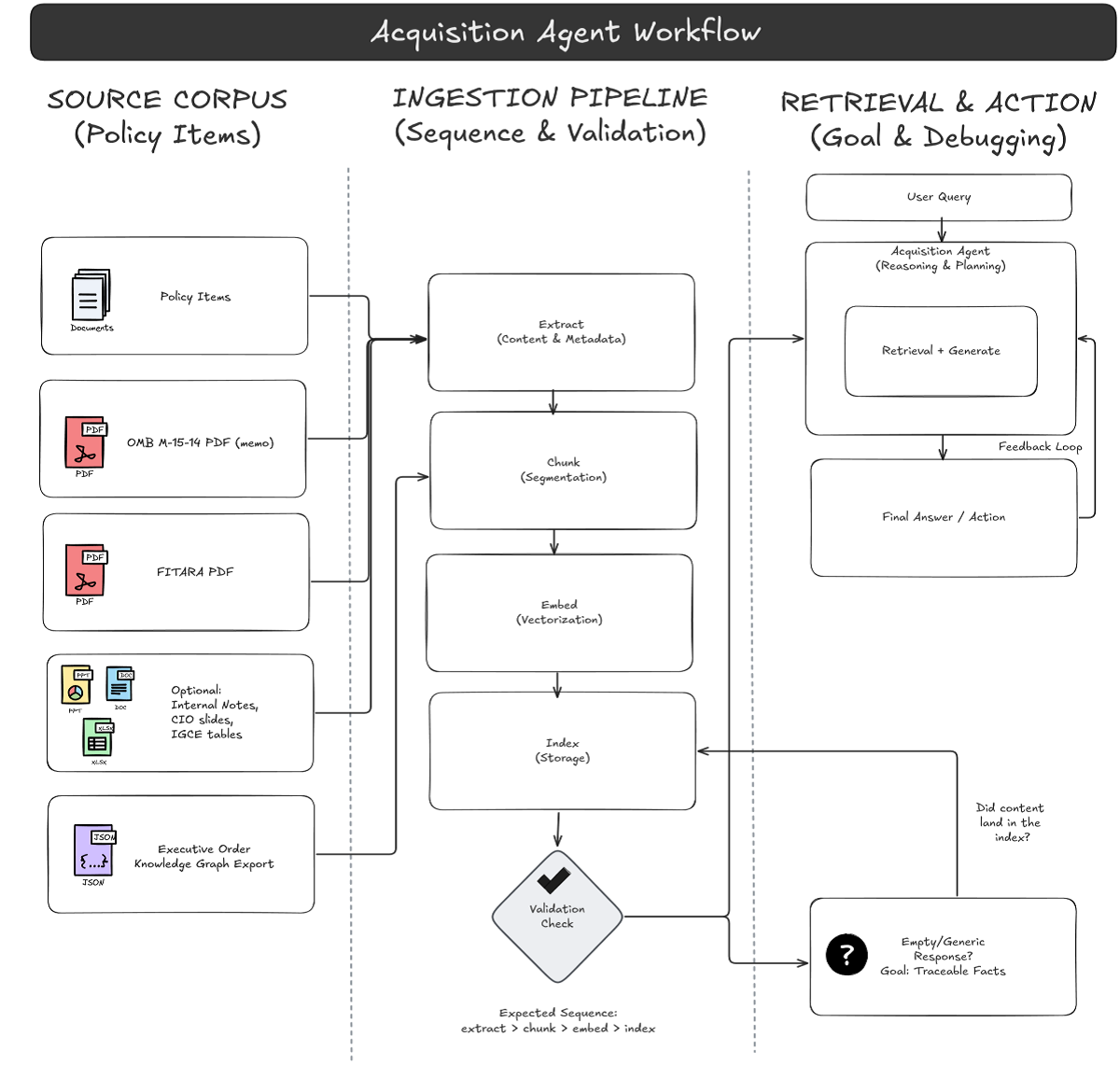
Here’s the RAG pipeline you’re deploying:
3. Authenticate users via Entra ID (Easy Auth at the App Service layer)
4. Upload documents and artifacts through the UI
5. Extract text/structure using Azure AI Document Intelligence
6. Chunk + embed using your Azure OpenAI embedding deployment
7. Index into Azure AI Search (two indexes: user + group scope)
8. Retrieve relevant chunks via hybrid retrieval (keyword + vector)
9. Generate a grounded answer using your deployed chat model, returning citations
Prerequisites
Local tools
• Git
• VS Code with Azure extensions (recommended deployment path)
• Azure CLI (only if you choose Zip Deploy instead of VS Code deployment)
Access and permissions
You’ll need permission to:
• Create Azure resources (App Service, Search, Cosmos DB, OpenAI, Document Intelligence)
• Create/configure Entra ID App Registration, Graph API permissions, app roles, and assignments
• Configure App Service Authentication (Easy Auth)
Step-by-step deployment
Step 1 – Provision Azure resources
Provision the following (same region where possible):
App Service (Frontend)
• Publish: Code
• Runtime: Python 3.12
• OS: Linux
• Plan: Premium V3 P0v3
Capture the default URL (you’ll need it for Entra redirect URIs).
Azure OpenAI
Create an Azure OpenAI resource and deploy models with your chosen deployment names:
• GPT model: e.g., gpt-4o
• Embedding model: e.g., text-embedding-3-small
• Optional: dall-e-3
Azure AI Search
Create Azure AI Search (Standard S1 recommended baseline). You’ll initialize indexes later.
Azure Cosmos DB (NoSQL)
Create Cosmos DB for NoSQL using provisioned throughput with autoscale.
Azure AI Document Intelligence
Create Document Intelligence (Standard S0).Note: Optional services (Storage, Redis, Content Safety, Speech, Video Indexer) can be added later if you enable those features.
Step 2 – Set up authentication with Entra ID and App Service (Easy Auth
Create a new App Registration and set the redirect URI:https://<your-app-service-name>.azurewebsites.net/.auth/login/aad/callback
MICROSOFT_PROVIDER_AUTHENTICATION_SECRETAdd Microsoft Graph delegated permissions (and grant admin consent). Create app roles (at minimum Admin), then assign users/groups through the Enterprise Application.
Step 3 – Grant the app registration access to Azure OpenAI
Assign the Entra app/service principal the role needed to call Azure OpenAI (e.g., Cognitive Services OpenAI User).
Step 4 – Clone the repository
Assign the Entra app/service principal the role needed to call Azure OpenAI (e.g., Cognitive Services OpenAI User).git clone <YOUR_REPO_URL> cd <YOUR_REPO_FOLDER>
Step 5 – Configure environment variables (.env)
Copy example.env to .env, then populate required settings:
# Azure Cosmos DB
AZURE_COSMOS_ENDPOINT="<your-cosmosdb-account-uri>"
AZURE_COSMOS_KEY="<your-cosmosdb-primary-key>"
AZURE_COSMOS_AUTHENTICATION_TYPE="key" # key | connection_string | managed_identity

# Azure AD Authentication (Required)
CLIENT_ID="<your-app-registration-client-id>"
TENANT_ID="<your-azure-ad-tenant-id>"

# Flask session signing secret
SECRET_KEY="Generate-A-Strong-Random-Secret-Key-Here!"

# Cloud environment
AZURE_ENVIRONMENT="public" # public | usgovernment | custom
Upload settings to App Service via VS Code: Azure App Service: Upload Local Settings.
Step 6 — Initialize Azure AI Search indexes
SimpleChat expects two indexes:
• simplechat-user-index
• simplechat-group-index Create them by importing JSON from the repo:
• artifacts/ai_search_index/ai_search-index-user.json
• artifacts/ai_search_index/ai_search-index-group.json In Azure Portal: Azure AI Search → Indexes → + Add index → Import from JSON.
Step 7 — Deploy the application code to App Service
Option A (recommended): Deploy via VS Code Azure extension (Deploy to Web App). Option B: Zip Deploy via Azure CLI (zip contents, exclude .env, ensure SCM_DO_BUILD_DURING_DEPLOYMENT=true).SimpleChat expects two indexes: • simplechat-user-index • simplechat-group-index Create them by importing JSON from the repo: • artifacts/ai_search_index/ai_search-index-user.json • artifacts/ai_search_index/ai_search-index-group.json In Azure Portal: Azure AI Search → Indexes → + Add index → Import from JSON
Step 8 — Run the application and complete first-time configuration
Open your App Service URL and sign in. In Admin settings, complete the first-time configuration wizard to connect OpenAI, embeddings, AI Search, and Document Intelligence.
Ingest the federal IT acquisitions corpus
Now validate the pipeline using the artifacts you actually care about.
Suggested starter corpus (3–6 items)
10. OMB M-15-14 (PDF)
11. FITARA overview / implementation guidance (PDF)
12. Executive Orders knowledge graph export (JSON)
13. Optional: internal acquisition policy notes, CIO governance slides, or control narratives.
About the JSON knowledge graph: If your ingestion path doesn’t handle raw JSON cleanly, export the graph to a text-friendly representation (Markdown/CSV/plain text) so it can be chunked and retrieved reliably.
Three test questions that prove retrieval is working
• Test 1 (policy precision): “In OMB M-15-14, what is the purpose of the memo and what does it provide guidance for?”
• Test 2 (semantic interpretation): “Under FITARA and the common baseline guidance, what oversight expectations strengthen the CIO’s role in IT management?”
• Test 3 (graph grounding): “From the Executive Orders knowledge graph, list the EOs connected to ‘IT procurement’ or ‘IT oversight’ and summarize how they relate. Cite the graph facts used.”
Success criteria: Each answer includes citations pointing back to specific source snippets. Confident answers without evidence are a retrieval/config issue, not a “model issue.”
Operational notes
Watch dependency latency and failures (OpenAI calls, AI Search queries, Document Intelligence ingestion). For scale and cost, tune AI Search capacity, Cosmos DB RU/s, and OpenAI usage.
Security notes
• Authentication: Easy Auth enforces Entra sign-in before your app code runs.
• Authorization: Entra app roles (e.g., Admin) control access to management features.
• Configuration: Secrets/settings live in App Service Application Settings (uploaded from .env), not in the repo.
Upgrading safely (deployment slots)
Upgrading safely (deployment slots)az webapp deployment slot swap \ --resource-group <RG_Name> \ --name <App_Name> \ --slot staging \ --target-slot production
Conclusion and next steps
You now have a working RAG application that fits a real federal acquisitions workflow: Entra-authenticated access, Azure AI Search as the retrieval backbone, and a pipeline that can ground answers in memos like OMB M-15-14, FITARA guidance, and structured governance artifacts like an EO knowledge graph.
Next steps:
• Metadata + filtering: tag content by bureau, fiscal year, acquisition category, or control family for better scoping.
• Evaluation: build a small “golden set” of acquisition questions and track retrieval quality + citation correctness over time.
• Production hardening: Key Vault for secrets, private endpoints, least-privilege RBAC review, and slot-based releases by default.